> ## Documentation Index
> Fetch the complete documentation index at: https://docs.terrafai.com/llms.txt
> Use this file to discover all available pages before exploring further.
# Templates
Templates are a core part of the document extraction process. They define **what information the system should extract** from a document and **how that information should be structured** in the final output.
A template is essentially a list of fields written in natural language that tells the system what to look for (for example, *invoice number* or *total amount*).
# Field Names
Field names are required for every piece of information you want to extract from a document.
When defining field names, simply think about the data you want to capture. For example, when extracting data from an invoice, you might start with:
* Invoice number
* Invoice date
* Invoice total
**Naming Rules:**
* Field names **cannot contain spaces**.
* If you type a field name with spaces, the system will automatically replace them with underscores.
* Example: `Invoice Number` → `Invoice_Number`
Field names should be **clear and descriptive**, as they become the keys in the extracted output.
# Data Types
Data types tell the system **how to interpret, format, and structure** the extracted information. Choosing the correct data type improves accuracy and enables advanced features such as line items and nested fields.
**Supported Data Types:**
| Date Type | Description |
| ------------------ | ------------------------------------------------------------------------------------------------------------------------------------------------------------- |
| Text | Use for standard text fields such as names, addresses, or descriptions. |
| Whole Numbers | Use for numbers without decimal places (e.g., quantities, counts). |
| Decimal Numbers | Use for numbers that include decimal values (e.g., prices, totals). |
| True/False | A boolean field. Use \*\*Rules \*\*to clearly define when the value should be set to `true` or `false`. |
| Date | Automatically extracts dates and formats them as `YYYY/MM/DD`. If you need a different format, use the **Text** data type and specify the format in the rules |
| List of Fields | Used to extract repeating data such as line items (explained below). |
| Section / Group | Used to logically group related fields together (explained below). |
| Choose from a List | Forces the system to select a value from a predefined list (enumeration). |
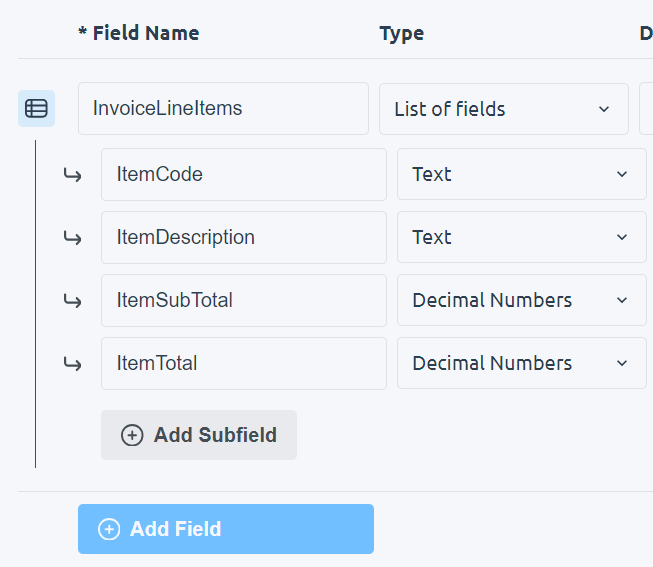
The **List of Fields** data type is used when the same set of information repeats multiple times in a document, such as invoice line items.
When you change a field’s data type to **List of Fields**:
* A first subfield is automatically created
* An **Add Subfield** button appears
Think of subfields as **column names** for each line item. For example, an invoice line item list might include:
* Item description
* Quantity
* Unit price
* Line total
**Nested Line Items:**
* A subfield can also be set to **List of Fields**, allowing line items within line items.
* The system supports **up to 2 levels of depth** for nested lists.
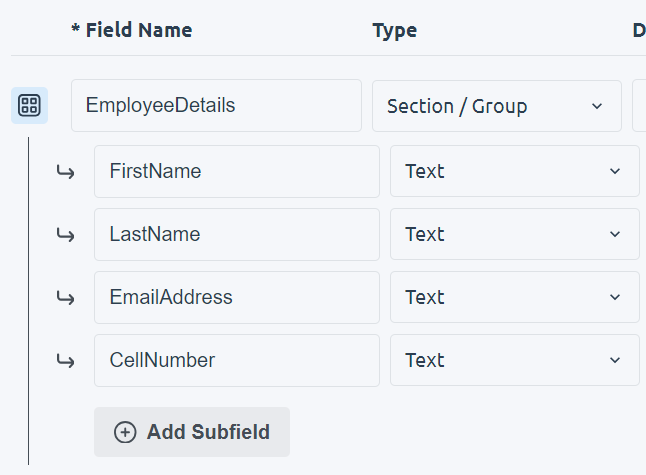
 **Sections / Groups** allow you to organize related fields under a single parent field.
They work similarly to **List of Fields**, with one key difference:
* **Subfields in a section do not repeat**
* They simply store child fields that logically belong together
**Example Use Cases:**
* Grouping billing address fields
* Grouping payment details
* Grouping vendor or customer information
**Nesting Rules:**
* A **Section / Group** can contain:
* Text fields
* A **List of Fields**
* Another **Section / Group**
* You are limited to **2 levels of nesting** in total.
**Sections / Groups** allow you to organize related fields under a single parent field.
They work similarly to **List of Fields**, with one key difference:
* **Subfields in a section do not repeat**
* They simply store child fields that logically belong together
**Example Use Cases:**
* Grouping billing address fields
* Grouping payment details
* Grouping vendor or customer information
**Nesting Rules:**
* A **Section / Group** can contain:
* Text fields
* A **List of Fields**
* Another **Section / Group**
* You are limited to **2 levels of nesting** in total.
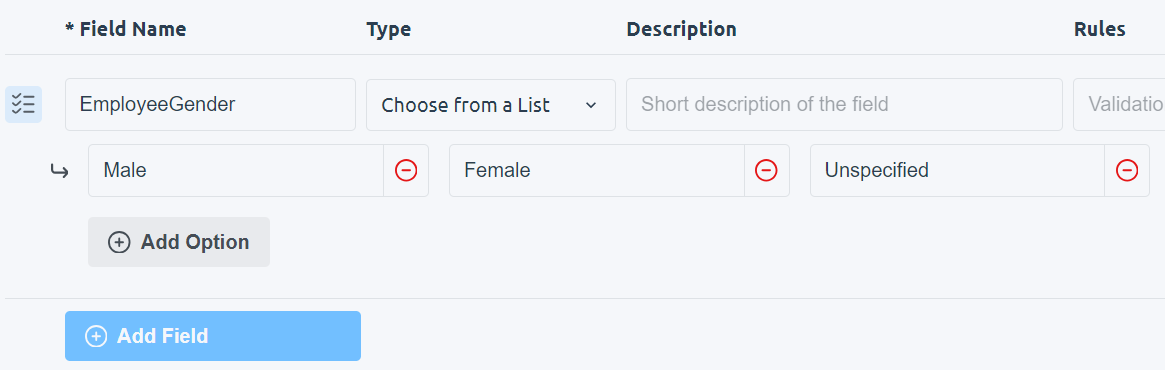
 The **Choose from a List** data type restricts the extracted value to a predefined set of options. This is effectively an **enumeration**.
Use this when the output should always be one of a known set of values, such as:
* Payment method: `Credit Card`, `Bank Transfer`, `Cash`
* Document type: `Invoice`, `Receipt`, `Purchase Order`
This helps enforce consistency and prevents unexpected outputs.
The **Choose from a List** data type restricts the extracted value to a predefined set of options. This is effectively an **enumeration**.
Use this when the output should always be one of a known set of values, such as:
* Payment method: `Credit Card`, `Bank Transfer`, `Cash`
* Document type: `Invoice`, `Receipt`, `Purchase Order`
This helps enforce consistency and prevents unexpected outputs.
 # Description
The **Description** field helps the system **locate the correct information** in the document when it is unclear or poorly labeled.
Use the description to explain:
* Where the information appears in the document
* What the information looks like
* How it is labeled (or mislabeled)
**Guidelines:**
* Descriptions are **optional**
* It is recommended to **leave this empty unless the system struggles**
* Overusing descriptions can reduce flexibility
# Rules
Rules describe **what the system should do with the extracted information before returning it**.
While descriptions answer:
> “Help me find this information”
Rules answer:
> “What should I do with this information once I find it?”
Rules are written in natural language and can be used to:
* Transform values
* Split combined fields
* Normalize formats
* Apply logic (e.g., when to set a boolean value)
\*\*Example Use Case:\*\*xample Use Case
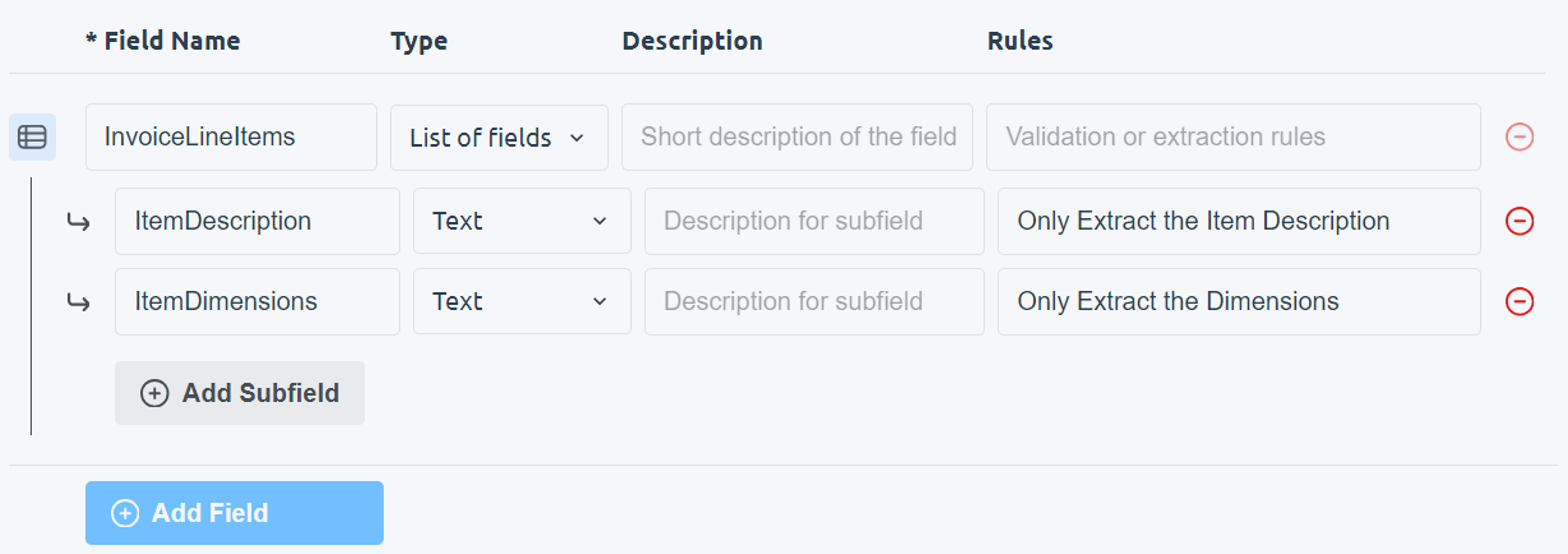
In one example, a document contained a single column labeled **Description** that included both:
* The item name
* The item dimensions
Using **Rules**, the system was instructed to:
* Separate the item description from the dimensions
* Store each value in its own field during extraction
# Description
The **Description** field helps the system **locate the correct information** in the document when it is unclear or poorly labeled.
Use the description to explain:
* Where the information appears in the document
* What the information looks like
* How it is labeled (or mislabeled)
**Guidelines:**
* Descriptions are **optional**
* It is recommended to **leave this empty unless the system struggles**
* Overusing descriptions can reduce flexibility
# Rules
Rules describe **what the system should do with the extracted information before returning it**.
While descriptions answer:
> “Help me find this information”
Rules answer:
> “What should I do with this information once I find it?”
Rules are written in natural language and can be used to:
* Transform values
* Split combined fields
* Normalize formats
* Apply logic (e.g., when to set a boolean value)
\*\*Example Use Case:\*\*xample Use Case
In one example, a document contained a single column labeled **Description** that included both:
* The item name
* The item dimensions
Using **Rules**, the system was instructed to:
* Separate the item description from the dimensions
* Store each value in its own field during extraction